
Codex vs Claude Code comes down to speed against coordination, and both tools swapped in new default models in late July 2026. Claude Code runs Claude Opus 5, which leads SWE-bench Verified at 97.0% on the independent vals.ai leaderboard and resolves 74% of DeepSWE tasks, the top score on that board. Codex runs the GPT-5.6 family with Sol recommended, which leads Terminal-Bench 2.1 on the vals.ai independent run (85.8% vs Opus 5's 84.6%) and resolves a DeepSWE task for $8.39 against Opus 5's $11.84. The old context-window gap is gone: both model families now read 1M tokens. Both run GA multi-agent workflows: Codex spawns up to 8 parallel subagents in isolated cloud sandboxes, Claude Code runs Agent Teams that share a task list and message each other. Claude Code authors 326K+ GitHub commits per day, about 10% of all public commits. Both start at $20/mo, where ChatGPT Plus gives more sessions per dollar and Claude hits its caps sooner. Whether you search it as claude vs codex or claude code vs codex, the pick is the same: Codex for terminal speed, parallel sandboxes, and cost per task; Claude Code for coordinated depth, SWE-bench accuracy, and repo-scale refactors.
Write detailed specs and want the cheapest resolved ticket? Codex: $8.39 per DeepSWE task, 85.8% Terminal-Bench 2.1 (vals.ai), 8 parallel cloud sandboxes, and looser $20-tier limits. Work in large, messy repos where subtasks depend on each other? Claude Code: Opus 5's 97.0% SWE-bench Verified (vals.ai), 74% DeepSWE resolution, Agent Teams with messaging and dependency tracking. Run both $20 plans before paying either $100 tier; that is what we do.
Summary
Both tools re-platformed in late July 2026. Claude Code made Claude Opus 5 its default Opus model in the week of July 20 (Sonnet 5 is the default on Pro seats), and Codex moved to the GPT-5.6 family with Sol as the recommended model; GPT-5.4 retires from Codex on August 31. On the independent leaderboards, Opus 5 leads SWE-bench Verified at 97.0% (vals.ai) and DeepSWE at 74%; GPT-5.6 Sol leads Terminal-Bench 2.1 at 85.8% (vals.ai) and costs 29% less per resolved DeepSWE task. The real question is still the same: isolated speed (Codex) or coordinated depth (Claude), and what that costs in tokens.
| Dimension | OpenAI Codex (GPT-5.6 Sol) | Claude Code (Opus 5) |
|---|---|---|
| SWE-bench Verified (vals.ai independent) | Not run (OpenAI stopped reporting Verified in Feb 2026) | 97.0% (#1 on the board) |
| SWE-bench Pro (llm-stats vendor aggregate) | 64.6% (Sol) | 69.2% (Opus 4.8; Opus 5 not yet listed) |
| Terminal-Bench 2.1 (vals.ai independent) | 85.8% | 84.6% |
| DeepSWE (independent, shared harness) | 73% at $8.39/task | 74% at $11.84/task |
| Context window | 1M tokens (GPT-5.6 family) | 1M tokens (Opus 5, 128K output) |
| Multi-agent model | Subagents GA (8 parallel sandboxes) | Agent Teams + dynamic workflows |
| $20/mo limits | Plus: ~10-100 Sol uses per 5-hr window, published | Pro: unpublished compute caps, hit faster |
| GitHub commits/day | Not disclosed | 326K+ (~10% of all public) |
| Open source | Apache-2.0, 91K stars | Proprietary, 148K stars |
| Current default model | GPT-5.6 (Sol recommended; GPT-5.4 retires Aug 31) | Opus 5 (since week of July 20, 2026) |
| Latest release | v0.160.0 (October 1, 2026) | v2.1.289 (October 3, 2026) |
SWE-bench Pro Accuracy (October 2026)
Claude leads on Pro; Opus 5 has no entry yet
Source: llm-stats vendor aggregate, August 10, 2026. Vendor scaffolds run 10-30 points above Scale's standardized harness.
DeepSWE Resolution Rate (Aug 20, 2026)
Independent, same harness for every model, 113 tasks
Source: deepswe.datacurve.ai live leaderboard, updated August 20, 2026.
- Choose Codex if: You want terminal-first workflows (85.8% Terminal-Bench 2.1 on vals.ai), the cheapest resolved ticket ($8.39 on DeepSWE), subagent parallelism with up to 8 sandboxed workers, or published, more generous limits on the $20 tier
- Choose Claude Code if: You need coordinated agent teams with messaging and dependency tracking, top SWE-bench scores (97.0% Verified on vals.ai, 69.2% Pro), 74% DeepSWE resolution, or the agent view dashboard for session management
- Choose both if: You want Codex for speed + Claude's agent teams for complex orchestration; the two $20 plans together cost less than either $100 tier
SWE-bench Verified and SWE-bench Pro are different benchmark variants with different problem sets, and vendor-scaffold scores run 10-30 points above standardized harnesses. Two more caveats specific to this matchup: OpenAI stopped reporting SWE-bench Verified in February 2026, so GPT-5.6 has no Verified number to compare against Opus 5's 97.0%; and Opus 5 has no SWE-bench Pro entry yet, so the Pro comparison is Opus 4.8 (69.2%) against GPT-5.6 Sol (64.6%). DeepSWE and vals.ai's Terminal-Bench 2.1 run every model on the same harness, which is why we lean on them.
The Architectural Shift
Both tools now have GA multi-agent workflows, and they converged further in August. Codex shipped subagents GA on March 14 with a manager-worker model (up to 8 parallel agents) and added an interactive codex agents dashboard plus queued messaging to running sessions in v0.149.0 (August 20). Claude Code's Agent Teams use coordinated sub-agents with shared task lists and direct messaging, gained cross-session messaging in early August (v2.1.220+), and scale to dozens or hundreds of subagents via dynamic workflows. Both support goals (persistent objectives across sessions), memories (cross-session context), and plugin ecosystems with hooks. The "dedicated context window per subtask" pattern is now standard in both tools.
Token Usage: Claude Code vs Codex on Identical Tasks
Claude uses 3-4x more tokens but produces more thorough output
Source: Independent benchmark by community testers, Feb 2026. Claude's higher token count correlates with more deterministic, thorough outputs.
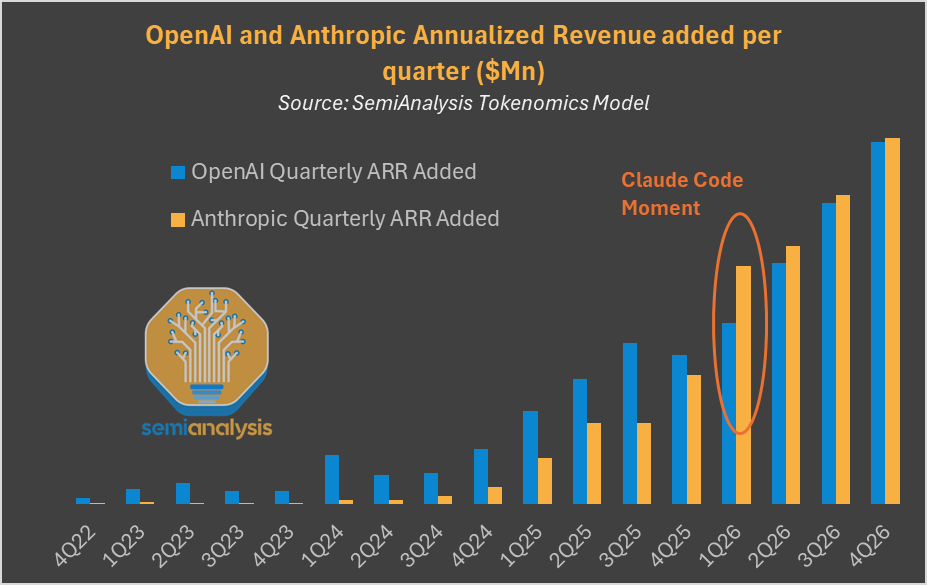
Source: SemiAnalysis Tokenomics Model. Anthropic's quarterly ARR growth accelerated sharply at the "Claude Code Moment" in Q1 2026.
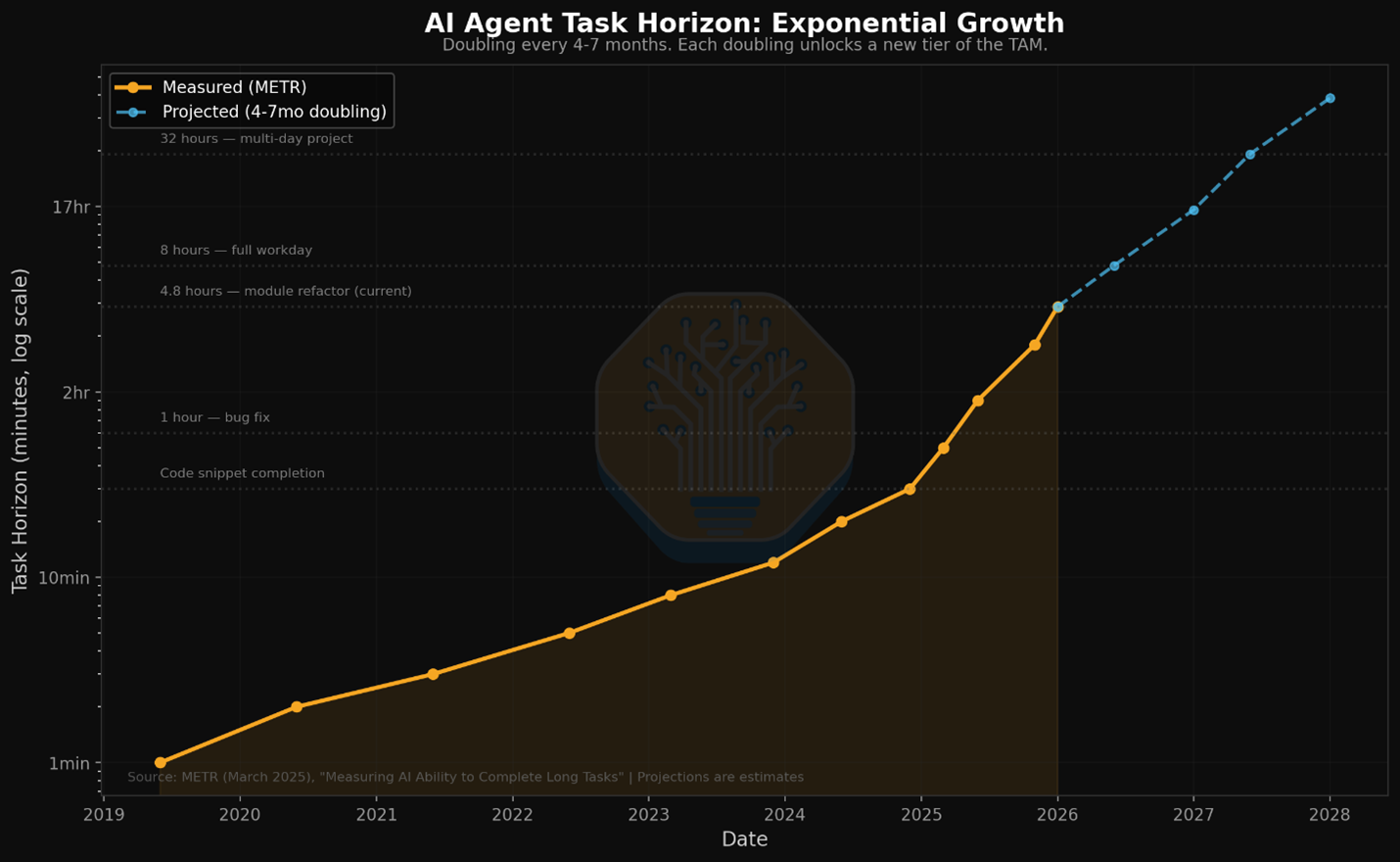
Source: METR / SemiAnalysis. AI agent task horizons are doubling every 4-7 months.
Stat Comparison
Synthetic benchmarks tell part of the story. These 5-bar ratings reflect daily workflow impact across speed, autonomy, consistency, subagent support, and limit generosity.
OpenAI Codex
GPT-5.6 speed + subagents GA with 8 parallel workers
"Maximum velocity with subagents GA and persistent goals."
Claude Code
Opus 5 + coordinated agent teams + cross-session messaging
"Best-in-class subagent coordination with agent view dashboard."
GitHub and Marketplace Stats (October 2026)
Claude Code
- 148,000 GitHub stars (up from 71.5K in Feb)
- v2.1.289 (October 3, 2026), ships multiple releases/week
- VS Code: 2M+ installs, Focus view added August 2026
- Opus 5 default since the week of July 20, 2026 (Sonnet 5 on Pro seats)
- Auto mode is the default permission mode since August 14
- ~326K GitHub commits/day (~10% of all public commits)
OpenAI Codex
- 91,000 GitHub stars (up from 62.4K in Feb)
- v0.160.0 (October 1, 2026), 800+ releases total
- Codex App: macOS + Windows, Chrome extension, mobile
- Rust-native CLI on the GPT-5.6 family (GPT-5.4 retires Aug 31)
- Subagents GA (March 14) + codex agents dashboard (v0.149.0)
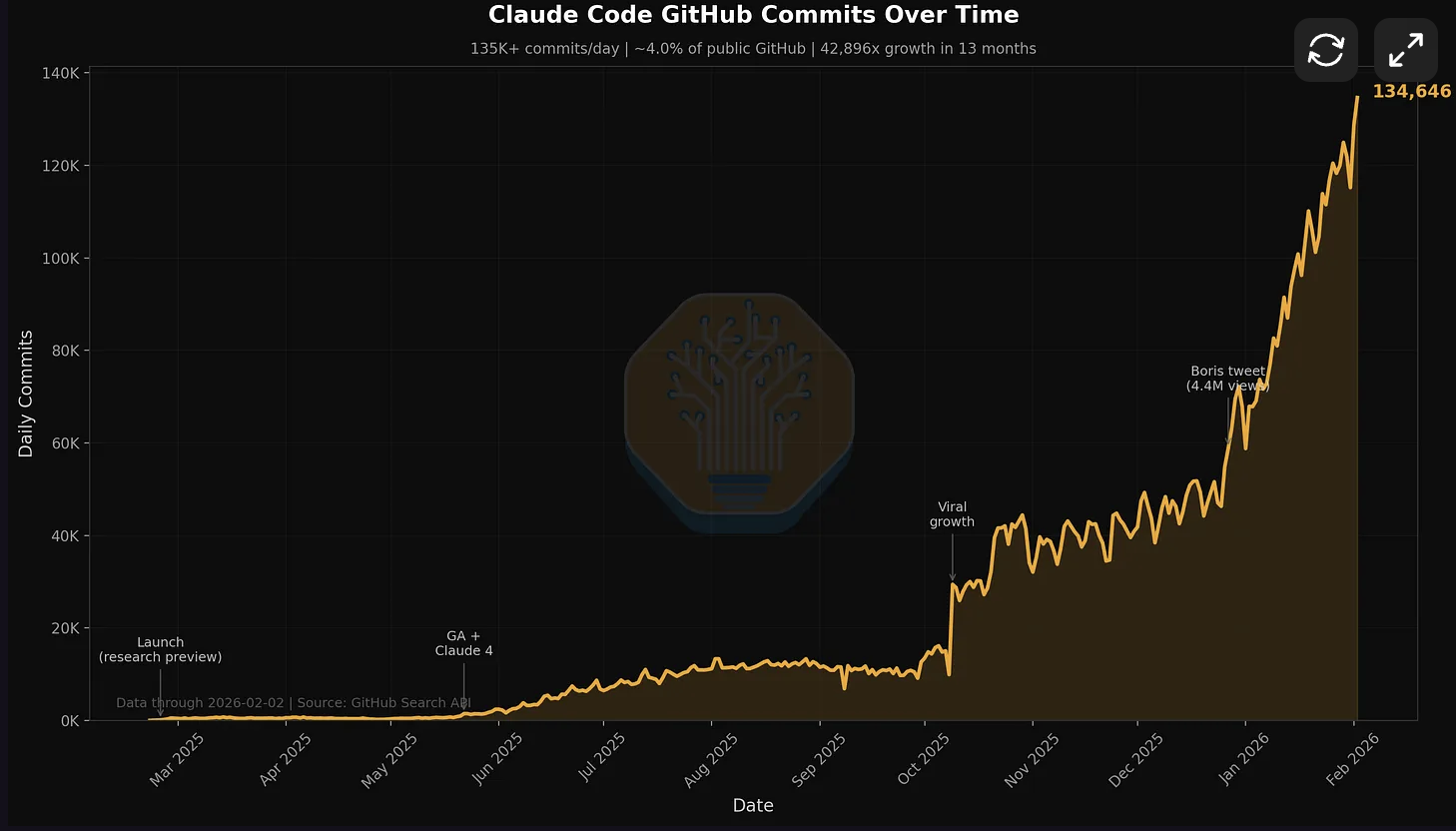
Source: SemiAnalysis / GitHub Search API. Claude Code now accounts for ~10% of all public GitHub commits, up from 4% in February.
Reading the Stats
Codex optimizes for speed and autonomy at the cost of consistency. Claude Code optimizes for consistency and orchestration at the cost of limits. Neither dominates across all dimensions. Both have shipped steadily through August 2026: Codex got subagents GA, goals, memories, Agent Plugins, and the codex agents dashboard. Claude Code got Opus 5, cross-session messaging, auto mode by default, and self-hosted cloud environments in beta.
Subagent Architecture: How Each Tool Isolates Context
Both Codex and Claude Code now have production-ready multi-agent support. Codex shipped subagents to GA on March 14, 2026. Claude Code's Agent Teams continue to evolve with the new agent view dashboard (v2.1.139). A dedicated context window per task is now standard in both tools, but they implement it in fundamentally different ways.
Why Subagents Matter
The single biggest limitation of AI coding agents is context window pollution. You ask the agent to refactor authentication, it reads 40 files, and by the time it gets to the last file it has forgotten the patterns from the first. Subagents solve this by giving each subtask its own dedicated context window. The auth refactor agent does not share context with the test-writing agent. Each one focuses.
| Aspect | Codex (October 2026) | Claude Code (October 2026) |
|---|---|---|
| Multi-agent model | Subagents GA: manager + explorer/worker/default agents | Agent Teams: coordinated sub-agents with messaging |
| Isolation model | Cloud sandbox per task (container) | Git worktree per agent (local) |
| Max parallel agents | 8 per developer | No hard limit (burns limits per agent) |
| Task coordination | Manager decomposes and collects results | Shared task list with dependency tracking |
| Agent communication | Manager collects worker results | Direct messaging + broadcast between agents |
| Persistent goals | /goal: multi-day objectives, pause/resume | /goal: persistent work until condition met |
| Cross-session memory | Memories (configurable, off by default) | Auto-memory (saves project context) |
| Execution environment | Cloud (internet disabled for security) | Local machine (full access) |
Codex: Subagents GA (March 14, 2026)
A manager agent decomposes your task into subtasks and spawns explorer, worker, or default agents in parallel cloud sandboxes. Up to 8 agents run simultaneously. Each sandbox is isolated. The Symphony framework (open-source, Elixir-based) powers the orchestration internally.
Claude Code: Agent Teams + Agent View
Agent Teams let you spawn sub-agents that share a task list with dependency tracking, send messages to each other, and work in parallel on git worktrees. The new 'claude agents' command (v2.1.139) provides a dashboard to manage all running, blocked, and completed sessions in one view.
Dedicated Context Per Task
Both approaches validate the same insight: a dedicated context window per task is a lasting primitive. The question is whether you want isolated speed (Codex) or coordinated depth (Claude). For greenfield tasks that are independent of each other, Codex's isolation model wins. For complex refactors where subtasks have dependencies, Claude's coordinated teams win.
Claude Code: Agent Teams in Action
# Spawn a team for a complex feature
$ claude "Build the payment integration"

# Claude Code automatically:
# 1. Creates a team with task list
# 2. Spawns researcher agent → explores Stripe SDK patterns
# 3. Spawns implementer agent → writes the code (blocked until research done)
# 4. Spawns test-writer agent → writes tests in parallel
# Each agent has its own context window. No pollution.
# Agents message each other when done: "research complete, found 3 patterns"
# Task dependencies prevent implementer from starting before researcher finishes
Usage Limits: What the Pricing Pages Leave Out
This is the section that will save you hundreds of dollars. The pricing pages don't tell you the real story about limits.
As of August 2026, OpenAI publishes per-model usage ranges for Codex on a shared 5-hour window: ChatGPT Plus gets roughly 10-100 GPT-5.6 Sol uses, 25-200 Terra, and 250-2,000 Luna per window, with Pro at 5x ($100) or 20x ($200) those ranges. Anthropic still publishes no message counts: every Claude tier has a 5-hour rolling window plus weekly caps, shared between the chat app and Claude Code. The $20 tier gap persists: ChatGPT Plus gets more sessions per dollar than Claude Pro.
| Tier | Codex (ChatGPT) | Claude Code | Key Difference |
|---|---|---|---|
| $0 | Free: basic Codex access for quick tasks | Free: chat only, no Claude Code | Codex is the only agent with a $0 tier |
| $8/month | Go: lightweight Codex tasks | N/A | Entry tier for Codex only |
| $20/month | Plus: ~10-100 Sol / 25-200 Terra / 250-2,000 Luna uses per 5-hr window | Pro: Claude Code included, unpublished compute caps | Codex publishes its limits and they run looser |
| $100/month | Pro (5x): ~50-500 Sol uses per window | Max 5x: 5x Pro usage | Both have $100 tiers |
| $200/month | Pro (20x): ~200-2,000 Sol uses per window | Max 20x: 20x Pro usage | Both generous at this tier |
The Tier Structure in October 2026
OpenAI's ladder is $0 (Free), $8 (Go), $20 (Plus), $100 (Pro 5x), and $200 (Pro 20x), plus a $20/user Business tier. Anthropic's is $20 (Pro), $100 (Max 5x), and $200 (Max 20x). Both platforms sell additional credits at API rates when you hit limits, and Codex also runs against a plain API key for overflow.
The real cost question in 2026 is not the subscription price, it's how many agent sessions you get. With subagent workflows, each agent team run burns through limits faster because you are running multiple context windows in parallel. Codex caps at 8 subagents per developer. Claude's Agent Teams have no hard cap but eat limits proportionally to the number of sub-agents spawned.
Token Economics Nobody Discusses
A data point that should concern Claude users: in identical benchmark tasks, Claude Code used 4x more tokens than Codex.
| Task | Codex Tokens | Claude Tokens | Ratio |
|---|---|---|---|
| Figma Plugin Build | 1,499,455 | 6,232,242 | 4.2x more |
| Scheduler App | 72,579 | 234,772 | 3.2x more |
| API Integration | ~180,000 | ~650,000 | 3.6x more |
Why Claude Uses More Tokens
Claude's higher token usage is not necessarily waste. It correlates with more thorough, deterministic outputs. Claude "thinks out loud" more, asks clarifying questions, and provides more detailed explanations. Whether this is valuable depends on your use case.
Claude Token Philosophy
More tokens = more context = more thorough. Claude prioritizes completeness over efficiency, which helps with complex refactoring but burns through limits faster.
Codex Token Philosophy
Fewer tokens = faster completion = lower cost. Codex prioritizes efficiency, which means faster results but potentially less thorough coverage of edge cases.
API Pricing Reality (August 2026)
If you are running either agent against the API directly (not the subscription), the current rate cards:
- Claude Opus 5: $5 input / $25 output per 1M tokens (same rate card as Opus 4.8; fast mode runs $10/$50)
- Claude Sonnet 5: $2 / $10, made the standard price (the planned $3 / $15 increase was cancelled)
- GPT-5.6 Sol: $5 / $30; Terra: $2 / $12; Luna: $0.20 / $1.20 (after OpenAI's July 30 price cuts)
The agent-team arithmetic matters more than the headline rates. For workloads spawning multiple sub-agents, run Sonnet 5 or Terra workers under an Opus 5 or Sol lead: a worker token costs 40-96% less than a lead token on either side. Claude's effort levels (through "xhigh") and GPT-5.6's effort slider both let you tune cost against thoroughness per task.
The Configuration Tax: Setup Time Reality
Both tools have converged on features. Codex now has goals, memories, hooks, plugins, and vim mode. Claude Code now has the agent view dashboard, custom themes, effort levels, and /ultrareview. The configuration gap is narrower than in February.
Codex: What Changed Through August 2026
- codex agents dashboard: search, start, open, rename, and stop tasks interactively (v0.149.0, August 20)
- Queued messaging to running sessions (v0.149.0)
- Portable Agent Plugins with local and workspace catalog search (v0.147.0, August 4)
- Automated approvals via the --approve-for-me flag (v0.147.0)
- MCP 2026-07-28 protocol support with paginated discovery (v0.147.0)
- Thread pinning and forking with paginated history (v0.146.0, July 28)
- GPT-5.6 family (Sol recommended); GPT-5.4 retires August 31
- Subagents GA (March 14): manager-worker pattern, up to 8 parallel agents
- /goal command: persistent multi-day objectives with pause/resume (v0.128.0)
- Memories: cross-session context, git-backed workspace diffs (configurable)
- Vim mode in TUI composer with /vim command (v0.129.0)
- codex remote-control: headless app-server for CI/pipeline integration (v0.130.0)
- Chrome extension with parallel tab support (May 7)
- Mobile support via ChatGPT mobile + Codex App connection (May 14)
- Hooks GA: lifecycle hooks browsable from /hooks (v0.129.0)
- GPT-5.5 model support, GPT-5.4 for Bedrock
- Plugin marketplace with workspace sharing and remote bundles
- 91,000 GitHub stars, 800+ releases, Apache-2.0
Claude Code: What Changed Through August 2026
- Opus 5 default (week of July 20): 97.0% SWE-bench Verified on vals.ai, 1M context, fast mode $10/$50
- Cross-session messaging: sessions pass findings to each other (v2.1.220+, early August)
- Auto mode is the default permission mode for new sessions on Pro, Max, and Team (August 14)
- Self-hosted cloud environments in public beta on Team and Enterprise
- Sonnet 5 default on Pro, Team Standard, and Enterprise seats (late June)
- Opus 4.8 default era (May 28): SWE-bench Verified 88.6%, Pro 69.2%, CursorBench 70%
- claude agents dashboard: unified view of all sessions (v2.1.139, May 11)
- /goal command: persistent work until completion condition met (v2.1.139)
- /ultrareview: parallel multi-agent cloud code review (v2.1.111)
- Effort levels: xhigh between high and max (v2.1.111, April 16)
- Auto mode available for Max subscribers without --enable flag
- Custom themes via /theme command (v2.1.118)
- Vim visual mode (v) and visual-line mode (V) (v2.1.118)
- Plugin ecosystem with marketplace, hooks, and MCP tool integration
- Push notifications via Remote Control (v2.1.110)
- PowerShell support on Windows (progressive rollout, v2.1.111)
- 132,000 GitHub stars, v2.1.238 (August 20, 2026), proprietary
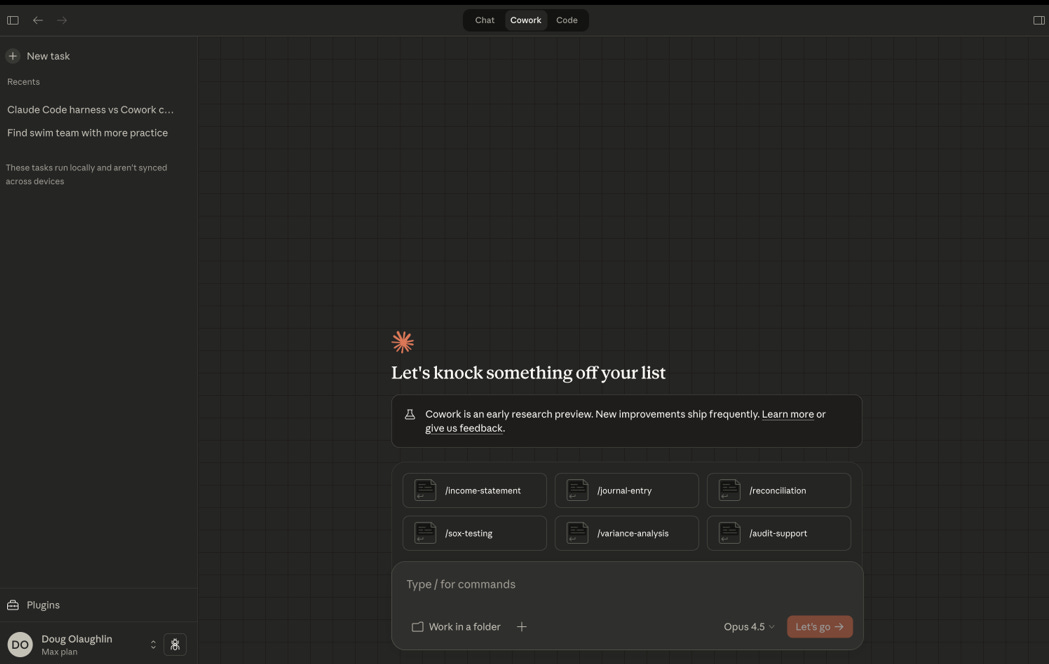
Anthropic's Cowork desktop app for Claude Code. Folder-based project management with task routing. Source: SemiAnalysis.
The configuration gap between these tools has narrowed. Both now support goals, memories, hooks, plugins, vim mode, and remote/headless operation. Codex ships AGENTS.md (similar to CLAUDE.md). The main remaining difference: Claude Code's hooks are more granular (PreToolUse, PostToolUse, PreCompact) while Codex's are lifecycle-scoped.
Claude Code: CLAUDE.md Example
# CLAUDE.md - Project-specific instructions

## Code Style
- Use TypeScript strict mode
- Prefer functional components
- No any types without explicit comment

## Architecture
- All API calls go through /lib/api
- State management via Zustand
- Never modify package.json without asking

## Testing
- Write tests before implementation (TDD)
- Minimum 80% coverage for new code
- Use React Testing Library patterns
With Claude Code, you can completely replace the system prompt. This is useful for creating specialized agents, but it is a time investment that Codex does not require.
Failure Mode Analysis: When Things Go Wrong
Both tools fail. Understanding HOW they fail tells you which failure mode you can tolerate.
Codex Failure Patterns
- Variability: Same prompt produces different results across runs
- Off-plan drift: Ignores instructions when "in the zone"
- Defensive over-engineering: Adds unnecessary error handling
- Style ignorance: Doesn't adapt to codebase patterns
- Context switching: Loses track in complex multi-file edits
- Multi-agent CSV fan-out: No mid-batch error recovery, one failure can stall the pipeline
- Security: zsh sandbox bypass fixed in v0.106.0, but raises questions about sandbox trust model
A "Codex is rapidly degrading" thread gained traction on the OpenAI community forum in spring 2026, with users reporting declining output quality. The GPT-5.6 switch reset much of that conversation, but same-prompt variability remains the most-reported Codex complaint. Worth monitoring if you are evaluating Codex for a long-term workflow.
Claude Code Failure Patterns
- Over-interruption: Asks permission too frequently (mitigated by auto-accept mode)
- Context window issues: Compaction hits after 5-6 prompts
- Limit walls: Stops mid-task when hitting caps
- Eager gap-filling: Makes assumptions without flagging them
- Token bloat: Verbose explanations eat into limits
For context on Claude Code's real-world reliability: Rakuten reported 99.9% numerical accuracy on a 12.5M-line codebase. At that scale, even small failure rates compound. The gap between Codex and Claude on consistency is measurable in production.
"Codex sometimes flags plausible edge-case database query concurrency bugs that I have to manually verify for 30 minutes, only to conclude they're hallucinations." (HN commenter)
The Recovery Question
When Codex fails, you typically need to re-prompt from scratch. When Claude fails, you can often guide it back on track through conversation. This makes Claude failures feel more recoverable, even if they happen more often due to limit issues.
The Context Window Problem: The Hidden Battleground
This battleground closed in July 2026. Claude Opus 5 reads 1M tokens with 128K max output; the GPT-5.6 family reads roughly 1M with 128K output. The differentiation moved from raw size to how each tool manages a long session.
| Aspect | GPT-5.6 / Codex | Claude Opus 5 / Claude Code |
|---|---|---|
| Raw context window | ~1M tokens, 128K output | 1M tokens, 128K output |
| Memory management | Diff-based forgetting + Memories MCP | Automatic compaction + auto-memory |
| Large file handling | Smooth up to 2000+ lines | Handles massive files across the full window |
| Multi-agent context | Isolated per sandbox, 8 agent cap | Shared via team config + task list |
| Long session stability | Excellent with diff-based forgetting | Improved: compaction + /goal for persistent work |
| Effort control | Standard reasoning levels | xhigh effort level (between high/max) |
With raw size tied at 1M, session management is the remaining difference. Codex uses diff-based forgetting plus a Memories MCP server (v0.129.0) that provides structured cross-session context with search, pagination, and line-offset reads. Claude Code's auto-memory and automatic compaction handle long sessions differently: summarizing old context instead of diffing it away. For a deep dive on why context rot degrades agent performance and how context compression techniques like FlashCompact address it, see our analysis.
Where Codex Wins
Terminal-Heavy Workflows
GPT-5.6 Sol leads Terminal-Bench 2.1 at 85.8% vs Opus 5's 84.6% on the independent vals.ai run (August 19, 2026), and OpenAI's vendor-reported Sol Ultra hits 91.9%. If your workflow is terminal-native (DevOps, scripts, CLI tools), Codex holds the edge. Vim motions in the TUI composer (v0.149.0) make it even more terminal-native.
Long Autonomous Sessions with Goals
The /goal command (v0.128.0) lets Codex schedule future work and wake up automatically to continue on long-term tasks, potentially across days or weeks. Combined with memories for cross-session context, Codex now handles truly persistent workflows.
Budget-Conscious Teams
ChatGPT Plus ($20) publishes its Codex limits (~10-100 Sol uses per 5-hour window) and they run looser than Claude Pro's unpublished caps. The $8 Go tier, the Free tier's basic Codex access, and Luna at $0.20/$1.20 per M tokens give more price points than Claude's lineup.
Cost Per Resolved Task
On the live DeepSWE leaderboard (August 20, 2026), GPT-5.6 Sol resolves 73% of tasks at $8.39 each against Opus 5's 74% at $11.84. Near-identical resolution, 29% less money. For a well-specified ticket queue, that column settles it.
Best For: Spec-Driven Parallel Workflows
If you write detailed specs and want to context-switch while the AI works, Codex is your tool. The Codex App (macOS + Windows), Chrome extension (May 7), and mobile access (May 14) make this workflow available everywhere. Subagents GA means you can spawn 8 parallel workers from a single task. The codex remote-control command (v0.130.0) enables headless operation for CI/pipeline integration.
Where Claude Code Wins
SWE-bench Accuracy, Both Variants
Opus 5 leads SWE-bench Verified at 97.0% on the independent vals.ai leaderboard, a board GPT-5.6 does not appear on since OpenAI stopped reporting Verified. On the harder SWE-bench Pro, Opus 4.8 holds 69.2% against GPT-5.6 Sol's 64.6% (llm-stats vendor aggregate). For real-world codebase fixes, Claude has the edge.
Massive Codebase Navigation
With 1M token context and CursorBench at 70% (up from 58% on Opus 4.6), Claude handles large codebases better. Rakuten confirmed 99.9% accuracy on 12.5M lines.
Session Orchestration at Scale
The 'claude agents' dashboard shows all running, blocked, and completed sessions; cross-session messaging (v2.1.220+, August 2026) lets sessions hand findings to each other; dynamic workflows script dozens to hundreds of subagents. Combined with /goal and /ultrareview, Claude Code's session management is more sophisticated.
Custom Automation via Hooks
Claude Code's hooks are more granular: PreToolUse, PostToolUse, PreCompact, PostToolUseFailure with duration_ms, continueOnBlock, and MCP tool invocation. Build CI-like pipelines around your agent workflows with fine-grained lifecycle control.
Best For: Multi-Agent Orchestration
If you want to architect a solution and let a team of agents execute it in parallel, with dependency tracking, inter-agent messaging, and shared task lists, Claude Code's Agent Teams remain the strongest option. 16 Claude agents wrote a 100K-line C compiler in Rust that compiles the Linux kernel 6.9 (99% GCC torture test pass rate, ~$20K API cost). That proof point still stands. With Opus 4.8's 7.8-point jump on SWE-bench Verified and 13.8-point jump on SWE-bench Pro (vs Opus 4.6 baseline), the per-agent quality improved significantly at no price increase.
"For production coding, I create fairly strict plans. Codex goes off plan most of the time. Claude follows them.",HN commenter
Hybrid Workflow: Using Both
Power users figured this out early: these tools complement each other. The optimal workflow is not choosing one. It is knowing when to switch.
The Optimal Hybrid Flow
- Prototype with Codex: Fast iteration, explore multiple approaches
- Review with Claude: Code review, catch edge cases Codex missed
- Refactor with Claude: Complex architectural changes with deterministic outputs
- Final polish with Codex: Quick fixes and formatting
Power User Hybrid Workflow (August 2026)
# 1. Scaffold with Codex subagents in cloud sandbox
$ codex "Implement user authentication with JWT, following patterns in /lib/auth"
# Manager spawns explorer + worker agents in parallel sandboxes
# /goal keeps the task alive across sessions if needed

# 2. Orchestrate review + hardening with Claude Agent Teams
$ claude "Review the auth implementation. Spawn a security reviewer agent
         and a test writer agent. Security reviewer checks for OWASP top 10.
         Test writer creates integration tests. Block merge until both pass."
# claude agents dashboard shows all agents' status
# /ultrareview runs parallel multi-agent cloud code review

# 3. Quick fix with Codex
$ codex "Fix these 3 security issues: [paste Claude's findings]"
# Done in 2 minutes, cloud sandbox, no context pollutionSeveral developers report using Codex specifically to review Claude's work. "I use Codex for review tasks. When working on something complex, I frequently ask Codex to review Claude's work, and it does a good job catching mistakes."
Decision Framework: Pick Your Tool in 30 Seconds
| Your Situation | Best Choice | Why |
|---|---|---|
| Multi-agent orchestration | Claude Code | Agent Teams with task deps + messaging + agent view |
| Parallel sandbox execution | Codex | Subagents GA: 8 parallel workers in cloud containers |
| Budget: $20/month | Codex | More sessions per dollar on ChatGPT Plus |
| SWE-bench accuracy | Claude Code | 97.0% Verified (Opus 5, vals.ai); 69.2% vs 64.6% on Pro |
| Cheapest resolved ticket | Codex | DeepSWE: $8.39/task (Sol) vs $11.84 (Opus 5) |
| Terminal-heavy workflows | Codex | 85.8% vs 84.6% Terminal-Bench 2.1 (vals.ai) |
| Large codebase refactoring | Claude Code | 1M context + agent teams for divide-and-conquer |
| Persistent multi-day tasks | Codex | /goal with auto-wakeup, memories for cross-session context |
| Custom automation | Claude Code | Granular hooks (PreToolUse, PostToolUse, PreCompact) |
| Want open-source CLI | Codex | Apache-2.0, Rust-native, 91K stars |
| Max context window | Tie | Both model families read 1M tokens |
What We Route Where
We run both tools daily against this codebase and our serving infrastructure, so here is the routing we actually use rather than a hypothetical. Well-specified tickets and CI scripting go to Codex: the spec is written, the completion criteria are clear, and $8.39 per resolved task beats $11.84 when the two models resolve at the same rate. Repo-wide refactors and "figure out why this is broken" investigations go to Claude Code, where an Opus 5 lead with Sonnet 5 workers fans out across the codebase and the agents hand findings to each other instead of us re-explaining context. Code review runs cross-tool: Codex reviews Claude's diffs and catches a different class of mistakes than the author model does. The one pattern we dropped: using either tool's $100 tier before maxing out both $20 plans.
Frequently Asked Questions
Is Codex or Claude Code better for coding in 2026?
As of October 5, 2026, it splits by benchmark variant. Claude Code runs Opus 5 (default since late July), which leads SWE-bench Verified at 97.0% on the independent vals.ai leaderboard and DeepSWE at 74% resolution. Codex runs GPT-5.6 with Sol recommended, which leads Terminal-Bench 2.1 on the vals.ai run (85.8% vs 84.6%) and resolves a DeepSWE task for $8.39 against Opus 5's $11.84. Claude Code authors ~10% of all public GitHub commits, roughly 326K per day. The biggest differentiator is still subagent architecture: isolated manager-worker execution (Codex, up to 8 parallel sandboxes) vs coordinated sub-agents with messaging (Claude).
Claude vs Codex: what are people actually comparing?
Claude is Anthropic's model family; Claude Code is the agent that runs those models in your terminal, IDE, or cloud. Codex is OpenAI's agent, running the GPT-5.6 family. So "claude vs codex" and "claude codex" searches are really Claude Code vs Codex, agent against agent, and the model matchup underneath is Claude Opus 5 vs GPT-5.6 Sol. That matchup: Opus 5 leads SWE-bench Verified (97.0%, vals.ai) and DeepSWE resolution (74% vs 73%); Sol leads Terminal-Bench 2.1 (85.8% vs 84.6%, vals.ai) and costs 29% less per resolved task.
What are Claude Code Agent Teams?
Agent Teams let you spawn multiple sub-agents that each get a dedicated context window. They share a task list with dependency tracking and can message each other directly. Each agent works in a git worktree for isolation. In May 2026, Claude Code added the "claude agents" dashboard (v2.1.139) for managing all sessions, and the /goal command for persistent work until a completion condition is met. The /ultrareview command (v2.1.111) runs parallel multi-agent code reviews in the cloud.
What are Codex subagents?
Codex shipped subagents to GA on March 14, 2026. A manager agent decomposes your task into subtasks and spawns explorer, worker, or default agents in parallel cloud sandboxes. Up to 8 agents run simultaneously. The Symphony framework (open-source, Elixir-based) powers the orchestration. Combined with /goal for multi-day persistence and memories for cross-session context, Codex now handles genuinely complex long-running projects.
Which has better usage limits: Codex or Claude Code?
Codex publishes per-model ranges on a shared 5-hour window: ChatGPT Plus ($20) gets roughly 10-100 GPT-5.6 Sol uses, 25-200 Terra, and 250-2,000 Luna per window; Pro is 5x that at $100 and 20x at $200, plus an $8 Go tier below. Anthropic offers Pro ($20), Max 5x ($100), and Max 20x ($200) with 5-hour rolling windows plus weekly caps and no published message counts. ChatGPT Plus gets more sessions per dollar at the $20 tier. Both sell overflow credits at API rates. Subagent workflows multiply limit consumption since each agent uses its own context window.
Can I use both Codex and Claude Code together?
Yes, and the hybrid workflow is increasingly common, including on our team. Use Codex for rapid prototyping and subagent-parallel implementation in cloud sandboxes, then use Claude Code's Agent Teams for code review (/ultrareview), security auditing, and complex refactoring with coordinated agents. The two $20 plans together cost less than either $100 tier.
Which is more open source?
Codex CLI is fully open-source under Apache-2.0, Rust-native, with 91,000+ GitHub stars and 800+ releases (v0.160.0 on October 1, 2026). Claude Code (148,000+ stars, v2.1.289 on October 3, 2026) ships multiple releases per week but is a proprietary Anthropic product. Both tools' underlying models are proprietary. Both have active plugin ecosystems.
WarpGrep v2 Boosts Any Coding Agent on SWE-bench Pro
WarpGrep v2 adds 2-3 points on SWE-bench Pro to every model tested: Opus 4.6 from 55.4% to 57.5%, Codex from 57.0% to 59.1%. It works as an MCP server inside Claude Code, Codex, Cursor, and any tool that supports MCP. Better search = better context = better code.
Sources
- Claude Code Changelog (v2.1.289, October 3, 2026)
- Claude Code What's New (Opus 5 default, cross-session messaging, auto mode)
- OpenAI Codex CLI Releases (v0.160.0, October 1, 2026)
- OpenAI: Codex Models (GPT-5.6 Sol / Terra / Luna; GPT-5.4 retirement)
- OpenAI: Codex Pricing and Per-Plan Limits
- vals.ai SWE-bench Verified Leaderboard (Opus 5 97.0%)
- vals.ai Terminal-Bench 2.1 Leaderboard (updated August 19, 2026)
- DeepSWE v1.1 Live Leaderboard (updated August 20, 2026)
- GPT-5.6 Tier Pricing After the July 30 Cuts
- SemiAnalysis: Claude Code is the Inflection Point (Feb 5, 2026)
- Anthropic Engineering: Building a C Compiler with Claude Agents
- CoreMention: Claude Code 326K+ Daily Commits Tracker
- SWE-bench Pro Leaderboard: Every Model Score
- Claude Code vs Cursor: Full Comparison