
Why Developers Leave Claude Code
Claude Code is not just impressive. It is becoming infrastructure. As of February 2026, Claude Code accounts for roughly 4% of all public GitHub commits (about 135,000 per day), and SemiAnalysis projects that number will exceed 20% by year-end. Anthropic is now a $14B ARR company at a $380B valuation. The latest release, v2.1.63, has 71,500 GitHub stars and 5.2M VS Code installs.
The irony: Claude Code is so good it has become indispensable, and the limits are exactly what drive developers to look elsewhere. Three problems consistently push power users toward Claude Code alternatives.
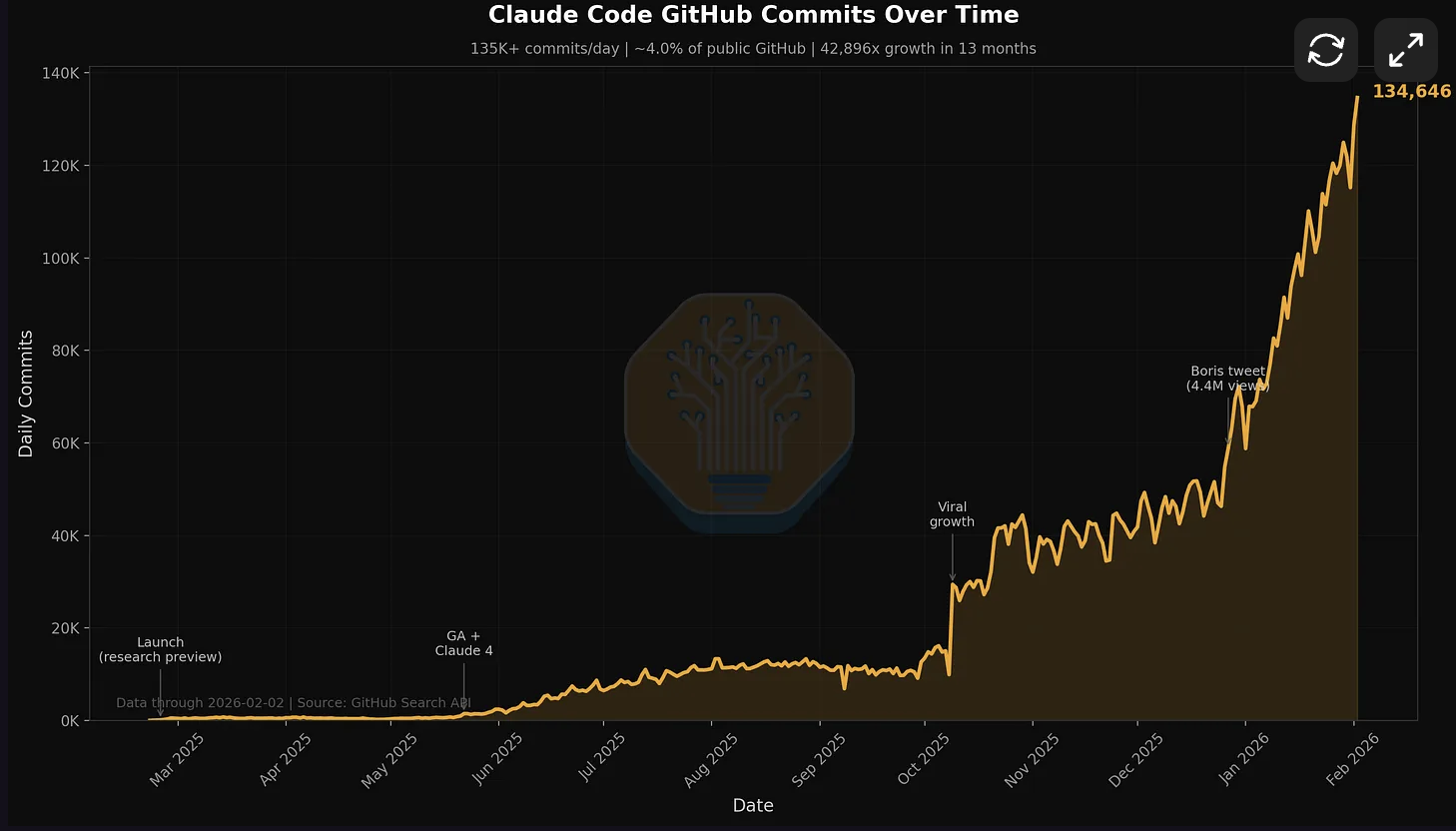
Source: SemiAnalysis / GitHub Search API. Despite accounting for 4% of all public GitHub commits, Claude Code's usage limits still push power users toward alternatives.
Problem 1: Usage Limits That Punish Power Users
Claude Code's $20 Pro tier gives most developers 10-20 meaningful coding sessions per week. By Wednesday, you are rationing. The $100 Max tier helps, but developers consistently report it does not deliver 5x the capacity you would expect for 5x the price. More like 2-3x.
Problem 2: Model Lock-In
Claude Code runs Anthropic models exclusively. You cannot swap in GPT-5, Gemini 3 Pro, or DeepSeek when Claude struggles with a particular task. Every other major alternative to Claude Code supports multiple model providers. This lock-in means when Anthropic has capacity issues or raises prices, you have no fallback.
Problem 3: Token Inefficiency
In head-to-head benchmarks, Claude Code consumed 4.2x more tokens than Codex on identical tasks. Claude used 6.2M tokens to build a Figma plugin where Codex used 1.5M. This verbosity is partly why limits feel so tight: Claude "thinks out loud" extensively, which improves accuracy but burns through your allocation.
The Real Question
The question is not whether Claude Code is good. It is excellent. The question is whether its constraints match YOUR workflow. If you need model flexibility, predictable costs, or IDE integration, alternatives exist that may serve you better.
The Complete Claude Code Alternatives List (2026)
We tested every tool on the same Next.js 15 codebase (47 files, 12,000 lines), measuring: time to complete a feature implementation, token usage, first-pass success rate, and how many human interventions each tool required.
| Tool | Type | Model Support | Starting Price |
|---|---|---|---|
| Cursor | IDE (VS Code fork) | GPT, Claude, Gemini, custom | $16/mo |
| OpenAI Codex | Terminal agent | OpenAI models only | $20/mo (ChatGPT Plus) |
| Aider | Terminal agent | Any model, any provider | Free (pay for tokens) |
| Cline | VS Code extension | Any model via API + free Kimi K2.5 | Free (pay for tokens) |
| GitHub Copilot | IDE extension | GPT, Claude, Gemini | $10/mo |
| Windsurf | IDE (Cognition/Devin) | Multiple models | $15/mo |
| OpenCode | Terminal agent | Any model | Free (pay for tokens) |
| Amazon Q Developer | IDE + CLI | Amazon models | Free tier available |
| Continue.dev | IDE extension | Any model, fully open | Free (open source) |
| Gemini CLI | Terminal agent | Google models | Free tier (Gemini) |
| Google Antigravity | Agent-first IDE | Google/Gemini models | Free (public preview) |
1. Cursor: The IDE-First Powerhouse
Best for: Developers who prefer visual workflows and want AI deeply integrated into their editor.
Cursor is not just an editor with AI bolted on. With v2.5 (released Feb 17, 2026), it is a full agent workbench at a $29.3B valuation and over $1B ARR. The v2.5 update brought a Plugin Marketplace, Cloud Agents that run 25-52+ hours autonomously, and async subagents that work in the background while you keep coding. This makes it a legitimate Claude Code alternative for developers who want autonomous capability without leaving the IDE.
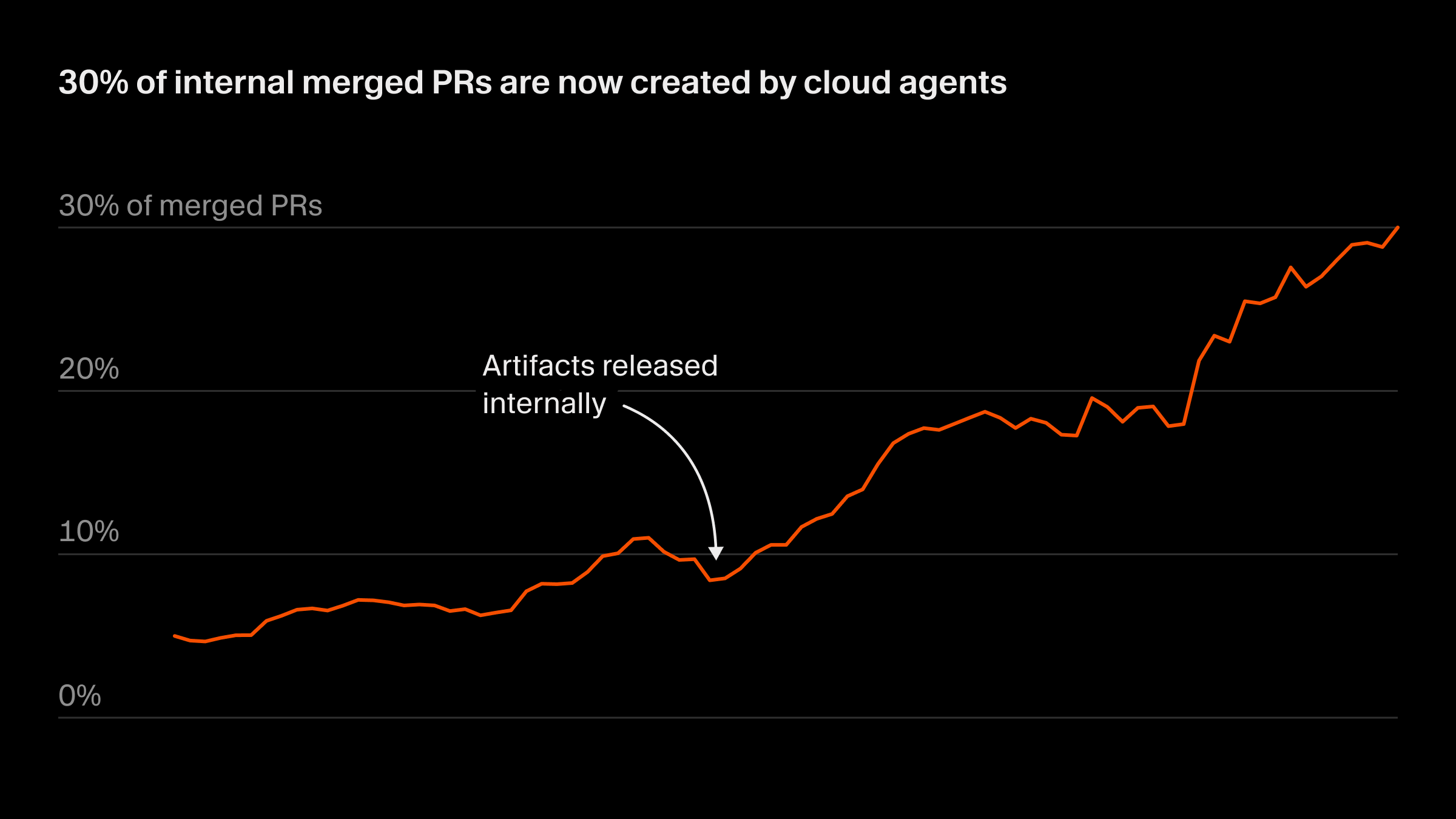
Source: Cursor Engineering Blog. Cursor now uses its own Cloud Agents to create 30% of its internal merged PRs.
What Cursor Does Better Than Claude Code
- Model flexibility: Switch between Claude Sonnet 4.5, GPT-5.3, Gemini 3 Pro, and Cursor's own Composer model mid-session
- Cloud Agents: Kick off tasks that run 25-52+ hours autonomously in the cloud, check back when done
- Tab completions: Unlimited intelligent autocomplete that predicts your next edit across files
- Visual diffs: See exactly what the AI wants to change before accepting, with inline accept/reject
- Plugin Marketplace: Extensible with community-built plugins (new in v2.5)
Where Cursor Falls Short
- Credit-based billing replaced flat-rate in June 2025. Heavy users report $10-20 daily overages
- Agent mode can be slower than Claude Code for purely terminal workflows
- The VS Code fork means you are tied to one editor ecosystem
Cursor Pricing Reality
Cursor Pro starts at $16/mo with credits equal to your subscription amount. Ultra is $200/mo with more credits and Cloud Agent access. Once credits run out, you pay per-model API rates. Power users can still run overages on expensive models. Budget carefully.
2. OpenAI Codex: The Autonomous Agent
Best for: Developers who write detailed specs and want the AI to execute with minimal hand-holding.
Codex is OpenAI's answer to Claude Code: a terminal-native agent now at v0.106.0 (rewritten in Rust) with 62,365 GitHub stars and 4.9M VS Code installs. The key difference is philosophy. Claude Code collaborates with you step-by-step. Codex prefers you to hand off a complete spec and let it run autonomously. The latest GPT-5.3-Codex-Spark model hits 1,000+ tok/sec on Cerebras (15x faster than the previous generation), and benchmarks show 56.8% on SWE-bench Pro and 77.3% on Terminal-Bench 2.0.
What Codex Does Better Than Claude Code
- Usage limits: Developers report 5x more productive sessions on the $20 tier compared to Claude Code Pro
- Token efficiency: Uses 3-4x fewer tokens for identical tasks
- Speed: GPT-5.3-Codex-Spark at 1,000+ tok/sec on Cerebras makes edits near-instant
- Voice input: Spacebar-triggered voice commands for hands-free coding
- Open source: Codex CLI is Apache-2.0 licensed with active community contributions
Where Codex Falls Short
- Outputs vary between runs. Same prompt can produce different implementations
- Tends to go off-plan when it thinks it knows better than your spec
- Locked to OpenAI models only, like Claude Code is locked to Anthropic
- Requires stronger prompt engineering skills to get consistent results
For a deep comparison, see our full Codex vs Claude Code analysis.
3. Aider: Open-Source Terminal Agent
Best for: Developers who want total control over model selection and costs.
Aider is the Claude Code alternative that costs nothing up front. It is fully open-source, supports 100+ programming languages, and works with any LLM provider: OpenAI, Anthropic, Google, DeepSeek, or local models via Ollama. You pay only for the tokens you consume, with zero markup from the tool.
Cursor
IDE-first agent with visual workflow
"The most polished AI coding experience, period."
Aider
Open-source power with total model freedom
"Maximum flexibility at minimum cost. The hacker's choice."
What Aider Does Better Than Claude Code
- Model freedom: Use Claude, GPT, Gemini, DeepSeek, or local models. Switch mid-session
- No usage limits: Your limits are your API budget, not an artificial cap
- Git integration: Automatically commits changes with descriptive messages
- Linting and testing: Runs your linter and test suite on AI-generated code, auto-fixes issues
- Repo mapping: Generates an internal map of your entire codebase for context
- Voice input: Speak your coding requests directly
Where Aider Falls Short
- Terminal-only interface has a steeper learning curve than IDE-based tools
- Context management requires more manual attention than Claude Code
- No built-in agent planning; relies more on single-turn interactions
- Quality depends entirely on which model you choose to back it
Aider: Getting Started
# Install
pip install aider-chat

# Use with Claude
export ANTHROPIC_API_KEY=sk-...
aider --model claude-sonnet-4-5-20250929

# Use with local model (free)
aider --model ollama/deepseek-coder-v2

# Add files to context and start coding
aider src/auth.ts src/middleware.ts
> Add rate limiting to the auth middleware
4. Cline: VS Code Agent with Full Control
Best for: VS Code users who want Claude Code-level autonomy inside their editor with full transparency.
Cline v3.66.0 (Feb 19, 2026) bridges the gap between Claude Code's terminal autonomy and Cursor's IDE integration. Now at 58.2K GitHub stars and 3M VS Code installs, it is a VS Code extension that can create files, run terminal commands, and use the browser, all while showing you exactly what it plans to do before it does it. BYOK (Bring Your Own Keys) means you control costs directly. The big recent addition: Kimi K2.5 bundled free with 1T parameters and 76.8% SWE-bench Verified, giving every Cline user access to a top-tier model at zero cost.
What Cline Does Better Than Claude Code
- Bundled free model: Kimi K2.5 (1T params, 76.8% SWE-bench Verified) included at no cost
- Transparency: Shows every planned action before execution. You approve each step
- Model agnostic: Works with any API-compatible model including local ones
- VS Code native: No separate terminal needed. Everything in your editor
- Browser use: Can interact with web pages for testing and debugging
- MCP support: Connects to Model Context Protocol servers for extended capabilities
Where Cline Falls Short
- API costs can spike unexpectedly with complex tasks (unless using the free Kimi K2.5 tier)
- Step-by-step approval can slow down large refactoring jobs
- Smaller community than Cursor or Copilot, though 58K stars and growing fast
5. GitHub Copilot: The Enterprise Standard
Best for: Teams already in the GitHub ecosystem who need enterprise-grade security and compliance.
Copilot has evolved well beyond autocomplete. Copilot Workspace can now autonomously plan and implement features, generate pull requests, and optimize across entire repositories. The agent mode handles multi-step tasks that previously required Claude Code. At $10/month for individuals, it remains the most affordable subscription-based Claude Code alternative.
What Copilot Does Better Than Claude Code
- Price: $10/month individual, $19/month business with enterprise controls
- GitHub integration: Native PR generation, issue resolution, and code review
- Model choice: GPT, Claude, and Gemini models available
- Enterprise features: SSO, audit logs, IP indemnity, policy controls
Where Copilot Falls Short
- Agent capabilities are still maturing compared to Claude Code and Codex
- Less autonomous than dedicated terminal agents
- Best experience requires GitHub ecosystem commitment
6. Windsurf: Agent-First IDE
Best for: Teams who want Devin-level autonomy inside an IDE, with task-driven development.
Windsurf is now owned by Cognition (the Devin team) after a $250M acquisition. Wave 14 introduced Arena Mode and direct Devin integration, turning Windsurf into a hybrid IDE + autonomous agent platform. LogRocket ranked it #1 in their February 2026 AI Dev Tool Power Rankings. It remains an agent-first editor that orchestrates multi-step tasks across repositories.
Key Differentiators
- Devin integration: Cognition's acquisition means direct access to Devin's autonomous agent capabilities
- Arena Mode: Run multiple AI models side-by-side and pick the best output (Wave 14)
- Cascade agent: Multi-step autonomous coding with environment awareness
- Free tier: Surprisingly capable free experience for evaluation
- LogRocket #1: Top-ranked AI dev tool in Feb 2026 power rankings
Where Windsurf Falls Short
- Cognition acquisition creates uncertainty about long-term product direction
- Smaller ecosystem and extension library than Cursor
- Agent reliability can be inconsistent on complex tasks
7. OpenCode: Model-Agnostic Terminal Agent
Best for: Developers who want a terminal agent like Claude Code but with total model freedom.
OpenCode (now at anomalyco/opencode) has exploded to 112,837 GitHub stars, making it the most-starred coding agent on GitHub. Version 1.2.15 has 2.5M monthly active developers and 779 contributors. OpenCode Black subscription tiers add premium features, but the core remains open-source and free. It does what Claude Code does but lets you plug in any model.
Key Differentiators
- Most-starred coding agent: 112K+ GitHub stars, 2.5M monthly active developers
- Model agnostic: GPT-5, Claude, Gemini, DeepSeek, local models via Ollama
- Terminal native: Same workflow philosophy as Claude Code
- LSP integration: Language server support for intelligent code understanding
- Open source: Full transparency, 779 contributors
Read our detailed OpenCode vs Claude Code comparison for benchmarks and workflow analysis.
8. Amazon Q Developer: AWS-Native AI Assistant
Best for: Teams building on AWS who need infrastructure-aware AI coding assistance.
Amazon Q Developer is Amazon's Claude Code alternative aimed squarely at AWS-heavy teams. It understands AWS services, can generate CloudFormation and CDK templates, and integrates with the AWS console. The free tier is generous enough for individual developers to evaluate seriously.
Key Differentiators
- AWS awareness: Understands your infrastructure, not just your code
- Security scanning: Built-in vulnerability detection aligned with AWS best practices
- Code transformation: Automated language and framework migrations
- Free tier: Meaningful free usage for individual developers
9. Continue.dev: Fully Open-Source IDE Extension
Best for: Privacy-conscious developers and teams who want complete control over their AI tooling.
Continue.dev is the most open alternative to Claude Code. Fully open-source, it runs as a VS Code or JetBrains extension and works with any model provider. Unlike Cline, Continue focuses more on autocomplete and chat rather than autonomous agent capabilities, but its transparency and extensibility are unmatched.
Key Differentiators
- Fully open source: Apache-2.0, no telemetry by default
- JetBrains support: Works in IntelliJ, PyCharm, WebStorm, not just VS Code
- Local model support: Run entirely offline with Ollama or LM Studio
- Custom context: Define exactly what code context the AI sees
10. Gemini CLI: Google's Terminal Agent
Best for: Developers in the Google ecosystem who want a free terminal-first AI agent.
Gemini CLI is Google's entry into the terminal-first AI coding space. Backed by Gemini models with massive context windows (up to 1M tokens), it excels at understanding large codebases in a single pass. The free tier through Google AI Studio makes it the cheapest way to experiment with a Claude Code-style workflow.
Key Differentiators
- Massive context window: Up to 1M tokens means entire codebases fit in context
- Free tier: Generous free usage through Google AI Studio
- Google ecosystem: Native integration with Google Cloud services
- Multimodal: Can process images, diagrams, and screenshots alongside code
11. Google Antigravity: Agent-First IDE from Google
Best for: Developers who want multi-agent orchestration with a manager view, and free access during public preview.
Antigravity is Google's brand-new agent-first IDE, built from scratch rather than forking VS Code. The standout feature is a manager view that lets you orchestrate multiple AI agents working on different parts of your codebase simultaneously. LogRocket ranked it #2 in their February 2026 power rankings, behind only Windsurf. It is free during public preview with no announced pricing yet.
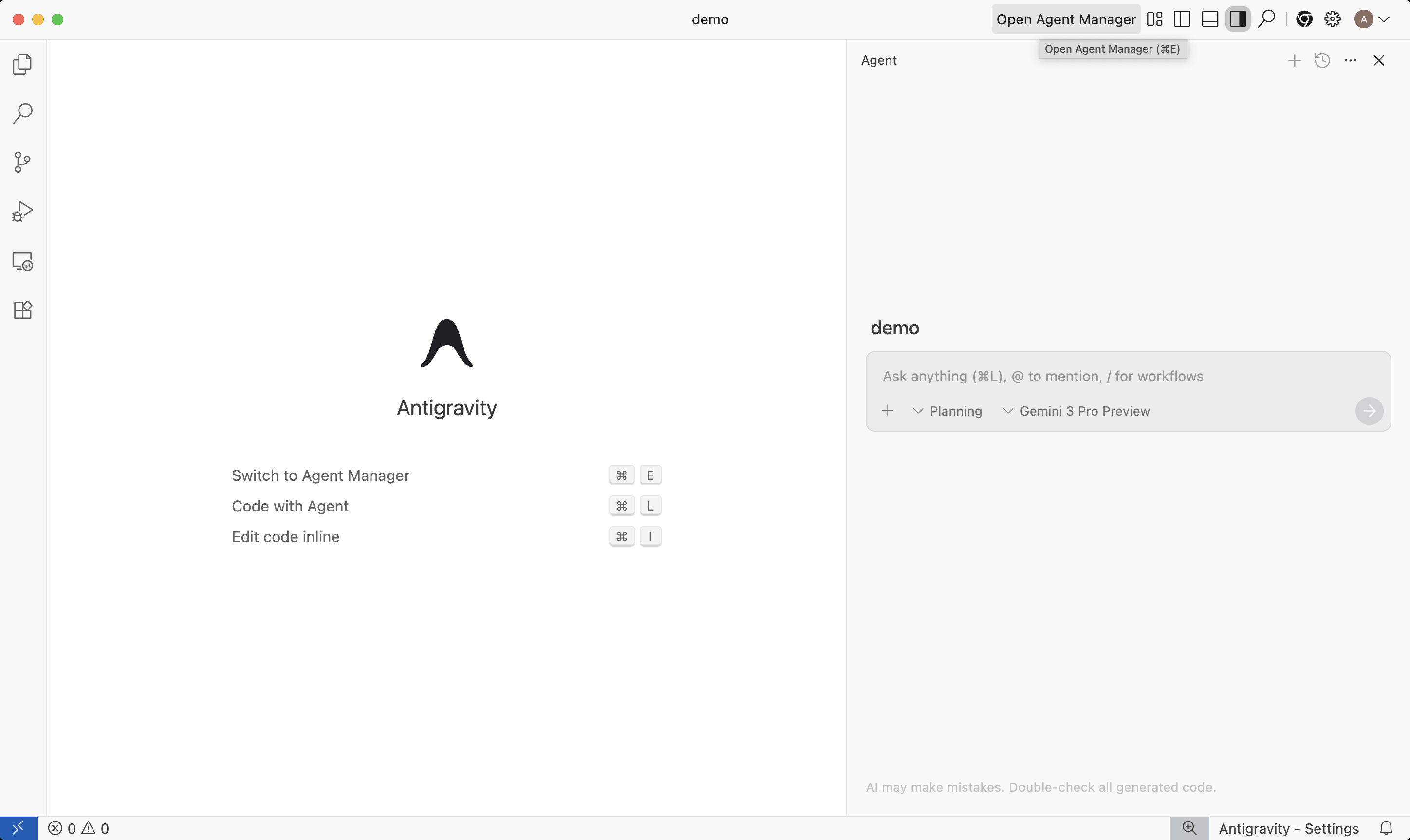
Google Antigravity: Editor view with Agent Manager panel. Source: Google Developers Blog.
Key Differentiators
- Multi-agent orchestration: Manager view to supervise and direct multiple agents at once
- Built from scratch: Not a VS Code fork. Purpose-built for agent-driven workflows
- Free preview: No cost during public preview, making it the cheapest way to test agent-first IDEs
- Google backing: Gemini models with massive context windows built in
- LogRocket #2: Second-ranked AI dev tool in Feb 2026 power rankings
Where Antigravity Falls Short
- Brand new, so extension ecosystem is nonexistent
- No pricing announced yet. Free preview could change to expensive quickly
- Limited to Google models during preview
Head-to-Head: Claude Code vs Every Alternative
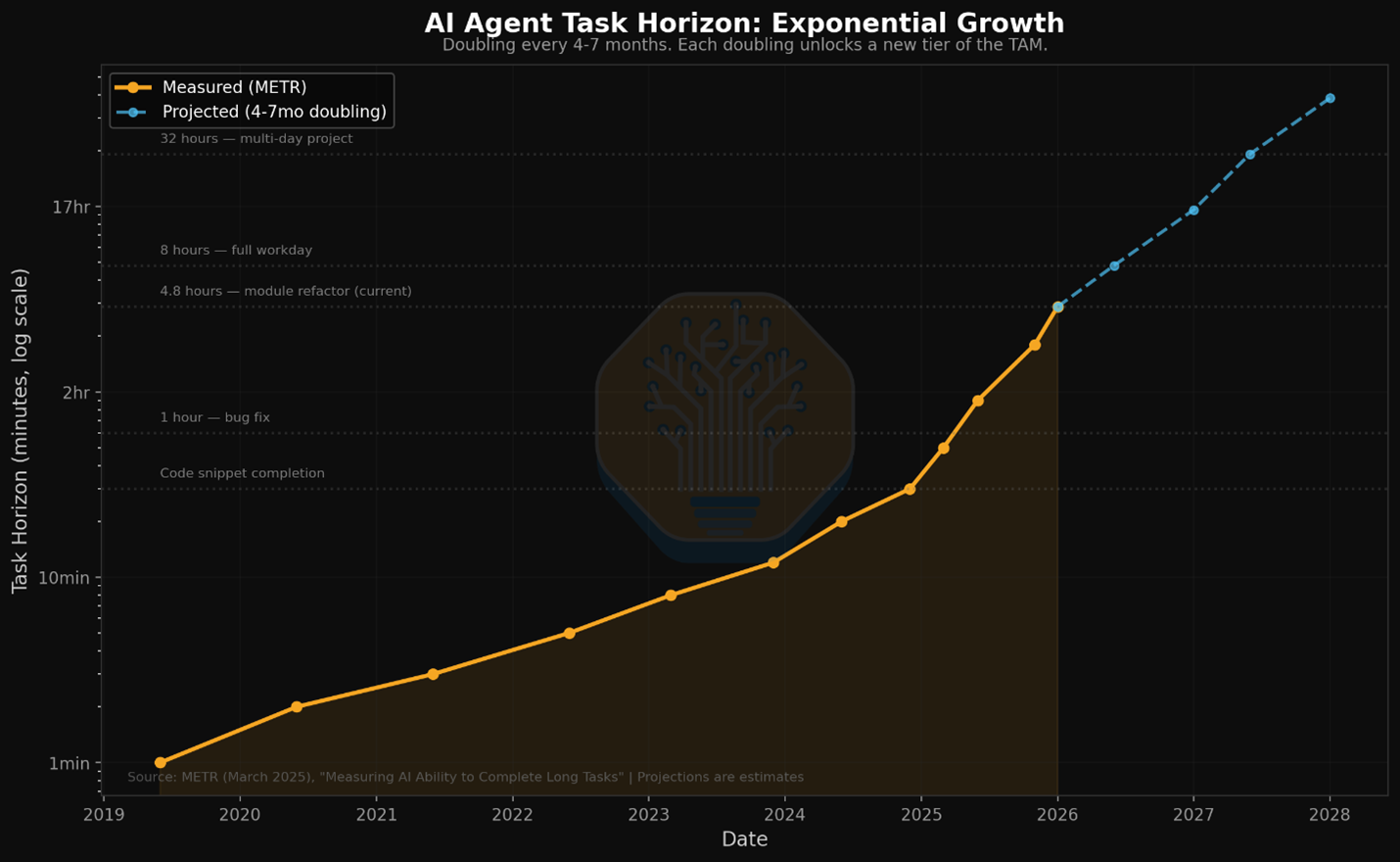
Source: METR / SemiAnalysis. AI agent task horizons are doubling every 4-7 months. Current agents handle multi-hour tasks; by 2028, projections reach multi-day projects.
| Feature | Claude Code | Cursor | Aider | Codex |
|---|---|---|---|---|
| Interface | Terminal | IDE | Terminal | Terminal |
| Model support | Claude only | Multi-model | Any model | OpenAI only |
| Autonomous agents | Yes | Yes (Agent mode) | Partial | Yes |
| Multi-file editing | Excellent | Excellent | Good | Good |
| Git integration | Native | Basic | Native | Native |
| MCP support | Yes | Yes | No | No |
| Open source | No | No | Yes | Yes (CLI) |
| BYOK | No | Partial | Yes | No |
| Context window | 200K | Varies by model | Varies by model | 200K+ |
| Voice input | No | No | Yes | Yes (spacebar) |
Pricing Breakdown: What Each Alternative Actually Costs
Pricing for AI coding tools in 2026 is more complex than a monthly number. Credit systems, token-based billing, and model-specific pricing mean the sticker price rarely tells the full story.
| Tool | Free Tier | Paid Start | Power User |
|---|---|---|---|
| Claude Code | No | $20/mo (Pro) | $100-200/mo (Max) |
| Cursor | 50 slow requests | $16/mo (Pro) | $200/mo (Ultra) |
| Aider | Unlimited (tool) | Pay per token | ~$30-80/mo typical |
| Codex | No | $20/mo (Plus) | $200/mo (Pro) |
| Cline | Unlimited (tool) | Pay per token | ~$20-60/mo typical |
| GitHub Copilot | Limited | $10/mo | $39/mo (Business) |
| Windsurf | Yes | $15/mo | $60/mo (Team) |
| OpenCode | Unlimited (tool) | Pay per token | ~$20-50/mo typical |
| Continue.dev | Unlimited | Pay per token | ~$20-50/mo typical |
| Gemini CLI | Yes (generous) | Gemini Advanced $20 | Pay per token |
| Google Antigravity | Yes (full preview) | TBD | TBD |
The BYOK Advantage
Tools that support Bring Your Own Keys (Aider, Cline, OpenCode, Continue.dev) typically cost 40-60% less than subscription-based alternatives for the same usage level. You pay provider rates directly with zero markup. The tradeoff is managing your own API keys and monitoring spend.
The Apply Problem: Where All Tools Struggle
Here is something none of these tools talk about openly: applying AI-generated code changes to your files is the bottleneck. The AI can reason about your code brilliantly. But the step where it translates that reasoning into actual file edits? That is where things break.
Why Apply Matters More Than Generation
Every tool on this list generates code diffs. The quality difference is in how those diffs get applied. Claude Code uses search-and-replace blocks. Aider uses its Polyglot diff format. Cursor uses its own apply model. Each approach has failure modes:
- Search-and-replace failures: Claude Code's approach breaks when the search string matches multiple locations or when the file has been modified since the AI read it
- Diff parsing errors: Aider's diff format can misalign on large files with many similar code blocks
- Model hallucination in diffs: All tools occasionally generate diffs that reference code that does not exist in the file
Morph Fast Apply: The Missing Layer
This is exactly the problem Morph Fast Apply solves. At 10,500+ tokens/second with 98% first-pass accuracy, it processes code edits from any tool and applies them correctly. It works as the apply layer underneath Claude Code, Aider, Cursor, or any other tool. Instead of choosing your tool based on which one applies edits best, choose based on workflow fit and let Morph handle the apply step.
Morph Fast Apply: Universal Apply Layer
# Works with any AI coding tool's output
curl -X POST https://api.morphllm.com/v1/apply \
  -H "Authorization: Bearer $MORPH_API_KEY" \
  -d '{
    "model": "morph-v3-fast",
    "original_code": "// your current file contents",
    "edit_snippet": "// AI-generated changes from any tool",
    "stream": true
  }'

# 10,500+ tok/sec — faster than any alternative
# 98% first-pass accuracy — fewer retries
# Works with Claude Code, Aider, Cursor, Codex output
Decision Framework: Pick Your Claude Code Alternative in 60 Seconds
| Your Situation | Best Alternative | Why |
|---|---|---|
| Want an IDE, not terminal | Cursor | Best agent mode + visual diff review |
| Budget under $20/mo | Aider + local model | Free tool + free inference |
| Need model flexibility | Aider or Cline | Use any model from any provider |
| Enterprise team | GitHub Copilot | SSO, audit logs, IP indemnity, $10/mo |
| AWS-heavy stack | Amazon Q Developer | Infrastructure-aware AI that knows your services |
| Maximum autonomy | OpenAI Codex | Longest autonomous runtime, best limits on $20 tier |
| Privacy-first | Continue.dev + Ollama | Fully open source, runs 100% offline |
| Largest context window | Gemini CLI | 1M token context window, free tier |
| VS Code + agent capability | Cline | Full autonomy inside your editor, BYOK |
| Task-driven team workflow | Windsurf | Devin integration + agent orchestration across repos |
| Multi-agent orchestration | Google Antigravity | Manager view for parallel agents, free preview |
The Honest Recommendation
Most developers switching from Claude Code end up on Cursor or Aider. Cursor if you want the polish of a dedicated product with an accessible interface. Aider if you want maximum control and minimum cost. Both support Claude models, so you keep the model quality while gaining flexibility on everything else.
Regardless of which tool you pick, the apply step is the universal bottleneck. Morph Fast Apply at 10,500+ tokens/second handles this for any tool in the stack.
Frequently Asked Questions
What is the best free alternative to Claude Code?
Aider is the best free alternative to Claude Code. It is fully open-source, runs in your terminal like Claude Code, and lets you bring your own API keys from any provider including OpenAI, Anthropic, Google, or local models via Ollama. You pay only for the LLM tokens you consume, with zero markup from the tool itself.
Is Cursor better than Claude Code?
Cursor and Claude Code serve different workflows. Cursor is better if you prefer a visual IDE with inline suggestions, Tab completions, and Agent mode for multi-file edits. Claude Code is better for terminal-native developers who want autonomous multi-step operations. Since Cursor 2.0, its Agent mode matches much of Claude Code's autonomous capability while adding visual diff review and model switching.
Why are developers switching away from Claude Code?
The top reasons developers switch from Claude Code are: aggressive usage limits on the $20 Pro tier where most hit limits by midweek, being locked to Anthropic models only, high token consumption per task at 4-6x more than competitors, and the lack of IDE integration for developers who prefer visual workflows.
Which Claude Code alternative has the best usage limits?
Aider has effectively unlimited usage since you bring your own API keys. Among subscription-based tools, OpenAI Codex offers the most generous limits on the $20 tier, with developers reporting 5x more productive sessions compared to Claude Code Pro. Cursor provides unlimited basic completions on all paid plans.
Can I use Claude Code alternatives with Claude models?
Yes. Aider, Cline, Continue.dev, and Cursor all support Claude models alongside other providers. You get Claude's strong coding capabilities without the usage limits and model lock-in of Claude Code itself.
Speed Up Any AI Coding Tool with Morph Fast Apply
Morph processes code edits at 10,500+ tok/sec with 98% accuracy. Works as the apply layer for Claude Code, Cursor, Aider, Codex, and any other tool.
Sources
- SemiAnalysis: Claude Code is the Inflection Point (Feb 2026)
- Anthropic: 2026 Agentic Coding Trends Report
- LogRocket: AI Dev Tool Power Rankings (Feb 2026)
- Terminal-Bench 2.0 Leaderboard
- DigitalOcean: Claude Code Alternatives for AI-Powered Coding (2026)
- Builder.io: Claude Code vs Cursor Comparison (2026)
- Aider: AI Pair Programming in Your Terminal
- Faros AI: Best AI Coding Agents for 2026
- Hacker News: Why Do Cursor, Windsurf and Claude Code Dominate?
- METR: Autonomous Task Horizons Doubling Every 4-7 Months